 StartEase
How to record time off for an employee: the Record leave card, box by box
How an Employer or payroll team records leave for an employee in StartEase: when to use Record leave, what each box and dropdown means, how full days skip company holidays, the checks it runs, and how recorded leave reaches balances, timesheets and payroll.
What is Record leave?
Record leave is a card on the Time off page where the Employer or the payroll team adds time off for an employee. The leave is approved at once, with your name and the time. It counts against the employee's balance and appears on their timesheet, just like a request you approved.
Employees ask for time off themselves under My time off › Request time off. Record leave is for the times they did not, or could not.
When should I use Record leave?
- An employee called in sick or phoned to ask for a day off.
- An employee forgot to ask before taking the day.
- You are entering leave that was agreed on paper or by email.
- An employee has no StartEase sign-in yet.
If the employee can ask in the app, let them. Their request then goes through the policy's notice rule and your approval.
How to record leave, step by step
Open Time › Time off. The Record leave card is under Waiting for approval. Its How to record leave link opens this page.
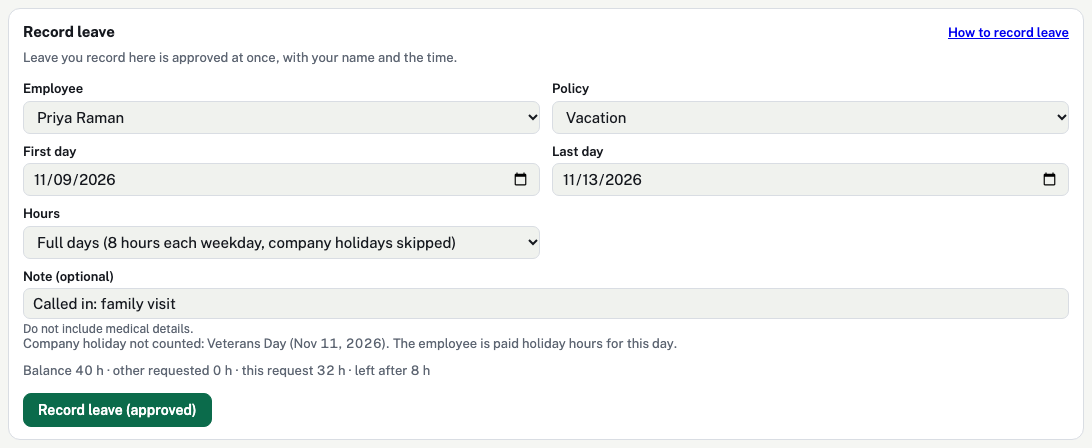
Each box on the card
| Box | What it means |
|---|---|
| Employee | Who the leave is for. Every employee of the company is listed. Choosing someone clears the Policy box, because each employee may be covered by different policies. |
| Policy | The kind of leave, and the balance it comes from. Only policies that are turned on, and that cover this employee, are listed. A sick policy is listed only after a payroll admin has confirmed it.
|
| First day | The first day of leave. It can be in the past, for leave already taken. |
| Last day | The last day of leave. Leave it blank, or the same as the first day, for one day. One record covers at most 62 days; for longer leave, record it in parts. |
| Hours | How the hours are counted.
|
| Note (optional) | A short note, up to 300 characters, for example "Called in". It shows under the policy name in the lists, and the employee can see it. Do not write medical details. |
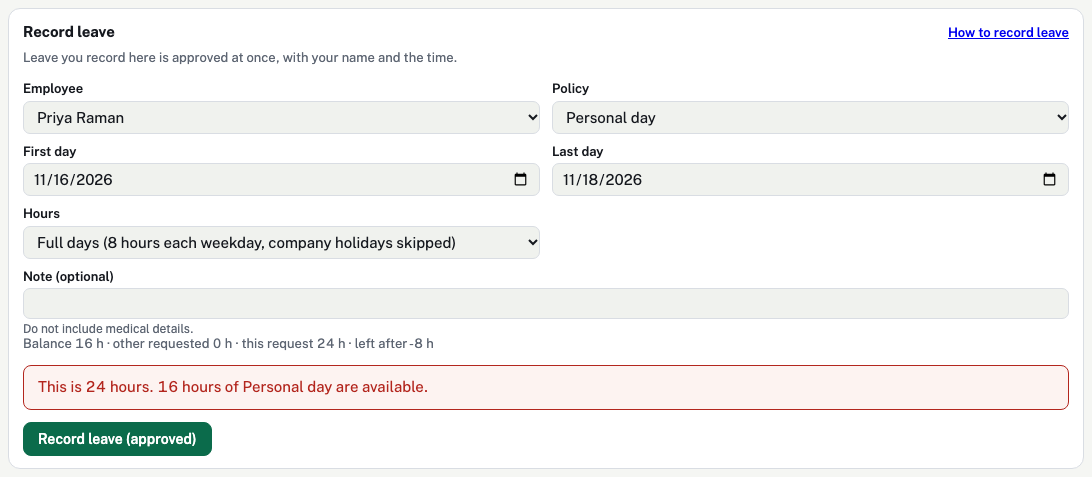
| The balance line | Appears once an employee, a policy and days are chosen: the balance, other leave already asked for or approved, this record, and what is left after it. An unlimited policy shows only the hours of this record. |
| Record leave (approved) | Checks the record and saves it as approved. If a check fails, a red box says why and nothing is saved. |
Partial days
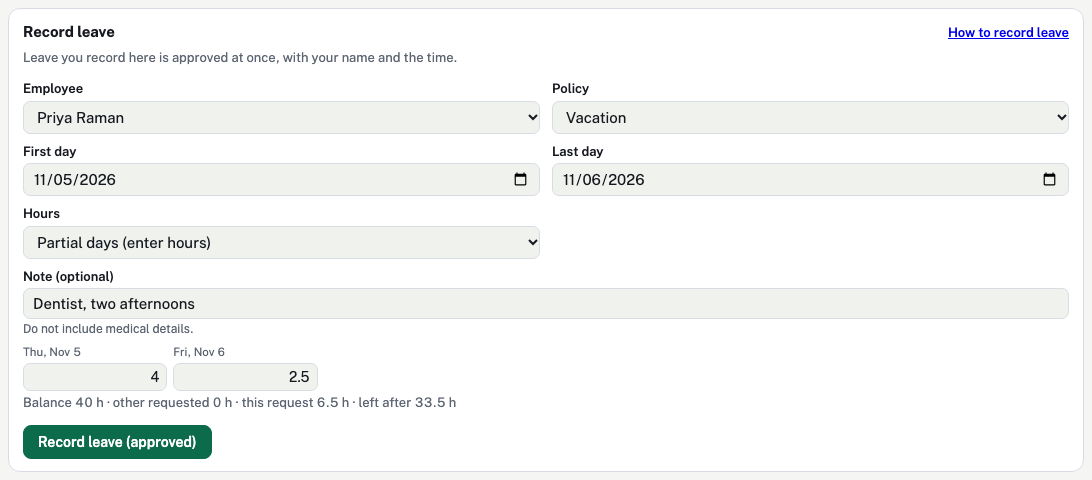
Use partial days for an afternoon off, a medical appointment, or a day when the employee worked part of the shift. Each day must be more than 0 and no more than 24 hours. Company holidays are not skipped in partial mode, so leave the holiday blank.
Why are company holidays skipped?
An employee who gets company holiday pay already receives the holiday hours on their timesheet. Counting the same day as vacation would pay it twice and take hours from the balance that the employee did not use. So Full days skips any company holiday that falls on a weekday in the dates, for employees the holiday calendar covers. Employees not covered by the holiday calendar are counted for every weekday.
What does StartEase check before it saves?
| Check | What the red box says, and what to do |
|---|---|
| Employee and policy chosen | "Choose an employee." or "Choose a policy." |
| The policy covers the employee | Add the employee to the policy under its Employees block. |
| The policy is on | Turn the policy on. A sick policy also needs a payroll admin to confirm it. |
| At least one day with hours | "Choose at least one day with hours." This also appears when every day chosen is a weekend or a company holiday. |
| Hours of 0 to 24 a day | Fix the partial-day hours. |
| Waiting period | The employee cannot use the policy yet. If the hire date is missing, enter it on the employee's profile. |
| Longest single request | The policy's limit on calendar days in one request. Record it in parts, or change the policy. |
| No overlap | The employee already has leave from this policy, waiting or approved, on one of the days. |
| Balance | More hours than are available, counting any negative balance the policy allows. Record fewer hours, or Adjust a balance under Balances if the balance is wrong. |
| Yearly use limit | The policy's most hours a policy year. |
The notice rule (ask so many days ahead) is not checked when you record leave. It applies only to employees' own requests.
What happens after I record leave?


- A green note says how many hours were recorded, for whom.
- The record appears under Recent decisions as Approved, with Recorded by, your name and the date. The change is also kept in the activity log.
- Under Balances, the hours show as Approved, not yet taken until the days pass, then as Used this policy year.
- The employee sees it under My requests on My time off.
- The leave appears on the employee's timesheet under Leave and holidays, and Run payroll pays it from the approved timesheet.
More: Time off vs timesheets.
How do I undo recorded leave?
Press Cancel on its row under Recent decisions. The hours go back to the balance. For the built-in PTO policy, leave on a day already in an approved payroll cannot be cancelled here; correct it in the next payroll instead.
Common questions
Can I record leave for a past date?
Yes. Pick past dates as First day and Last day. If that pay period has already been paid, ask your payroll team how to correct it in the next payroll.
Can I record unpaid leave?
Yes, if you have a policy set as unpaid. The leave is recorded the same way. Whether it is paid comes from the policy, not from this card.
Does recorded leave need approval?
No. It is approved when you record it. Use it only for leave you have agreed to.
Why is a week of full days less than 40 hours?
A company holiday falls in that week and the employee gets holiday pay, so that day is paid as a holiday, not as leave. The note under the form names the holiday.
Can an employee record leave for themselves?
No. Employees use Request time off on My time off. See Step by step: log hours, ask for time off, and approve.