 StartEase
Company holidays: how to set up paid holidays, and how they roll into next year
How to set up paid company holidays in StartEase: which federal holidays to observe, the weekend rule, paid holiday hours, your own holidays, who gets holiday pay, and how the dates move to next year by themselves.
What are company holidays?
Company holidays are the days your whole company closes and pays employees for, such as New Year's Day or Thanksgiving. In StartEase you set them once for the company on the Time off page. Each holiday then appears by itself on the timesheet of every employee it covers, with the paid hours you choose.
They are different from a floating holiday, which is a day each employee picks for themselves.
Is holiday pay required by law?
No, not by federal law. The U.S. Department of Labor says the Fair Labor Standards Act does not require payment for time not worked, such as holidays, and does not require extra pay for working on a holiday. Holiday pay is an agreement between employer and employee. For exempt salaried staff, federal rules say pay may not be cut for time when the employer has no work available, so a holiday closure does not reduce their salary in a week they work.
How to set up company holidays, step by step
Open Time › Time off and scroll to the Company holidays card. The card has a How company holidays work link back to this page.
1. Set up company holidays

| Box | What it means |
|---|---|
| Not set up | No holiday calendar yet. Nothing is added to timesheets. |
| Set up company holidays | Turns the calendar on with no holidays ticked, the weekend rule on, 8 paid hours, and all employees covered. Then work through the parts below. |
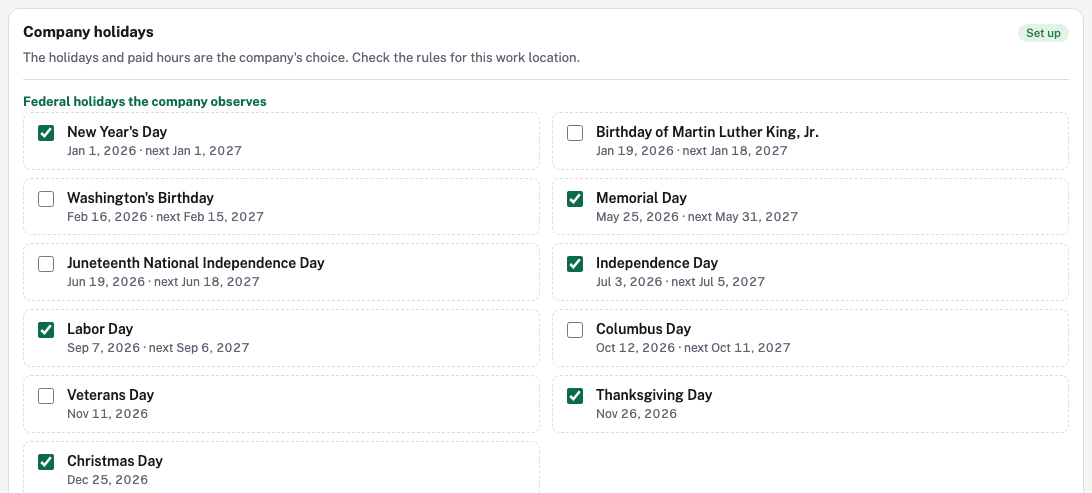
2. Federal holidays the company observes
| Box | What it means |
|---|---|
| A tick box for each of the 11 federal holidays | Ticked: the company closes and pays for this holiday every year. Unticked: it is a normal work day. You choose which ones to observe; private employers do not have to observe them all. |
| The dates under each name | This year's date, then "next" and next year's date once this year's has passed. StartEase works these out for every year, so you never type them. |
Each federal holiday is stored as a rule, not a date. Here is the rule for each one, and the 2027 date StartEase shows with the weekend rule on. These 2027 dates match the U.S. Office of Personnel Management's official schedule.
| Federal holiday | Rule | 2027 date |
|---|---|---|
| New Year's Day | January 1 | Fri, Jan 1, 2027 |
| Birthday of Martin Luther King, Jr. | Third Monday in January | Mon, Jan 18, 2027 |
| Washington's Birthday | Third Monday in February | Mon, Feb 15, 2027 |
| Memorial Day | Last Monday in May | Mon, May 31, 2027 |
| Juneteenth National Independence Day | June 19 | Fri, Jun 18, 2027 (June 19 is a Saturday) |
| Independence Day | July 4 | Mon, Jul 5, 2027 (July 4 is a Sunday) |
| Labor Day | First Monday in September | Mon, Sep 6, 2027 |
| Columbus Day | Second Monday in October | Mon, Oct 11, 2027 |
| Veterans Day | November 11 | Thu, Nov 11, 2027 |
| Thanksgiving Day | Fourth Thursday in November | Thu, Nov 25, 2027 |
| Christmas Day | December 25 | Fri, Dec 24, 2027 (December 25 is a Saturday) |
3. The weekend rule and paid hours

| Box | What it means |
|---|---|
| Move a holiday that falls on Saturday to Friday, and on Sunday to Monday | For fixed-date federal holidays, such as July 4.
|
| Paid hours for each holiday | The hours added to each covered employee's timesheet for every holiday, for example 8. Blank uses 8. 0 adds no holiday hours. The same number applies to everyone covered. |
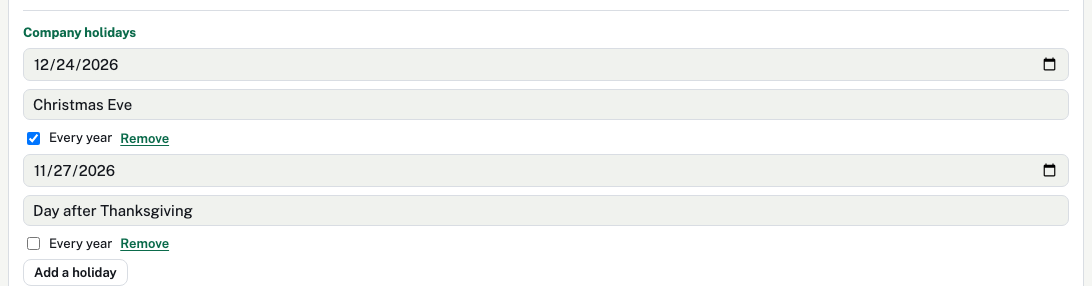
4. Company holidays you add yourself
| Box | What it means |
|---|---|
| Add a holiday | Adds a new line for a day your company closes that is not a federal holiday. |
| Date | The day of the holiday. |
| Name | What employees see, for example "Christmas Eve". Blank shows "Company holiday". |
| Every year | Whether the day comes back next year.
|
| Remove | Deletes the holiday from the calendar. |
5. Who gets holiday pay

| Box | What it means |
|---|---|
| All employees, including people added later | Ticked: every employee gets the holidays, now and in future.
|
6. Next 12 months
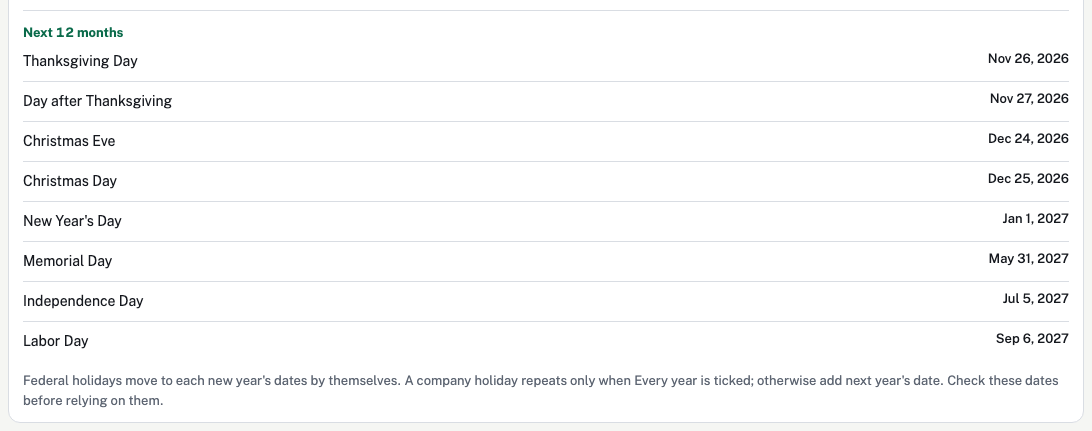
A read-only list of every holiday in the next 12 months, so you can check the dates before they reach a timesheet. It already shows next year's dates late in the year.
How holidays reach timesheets and payroll
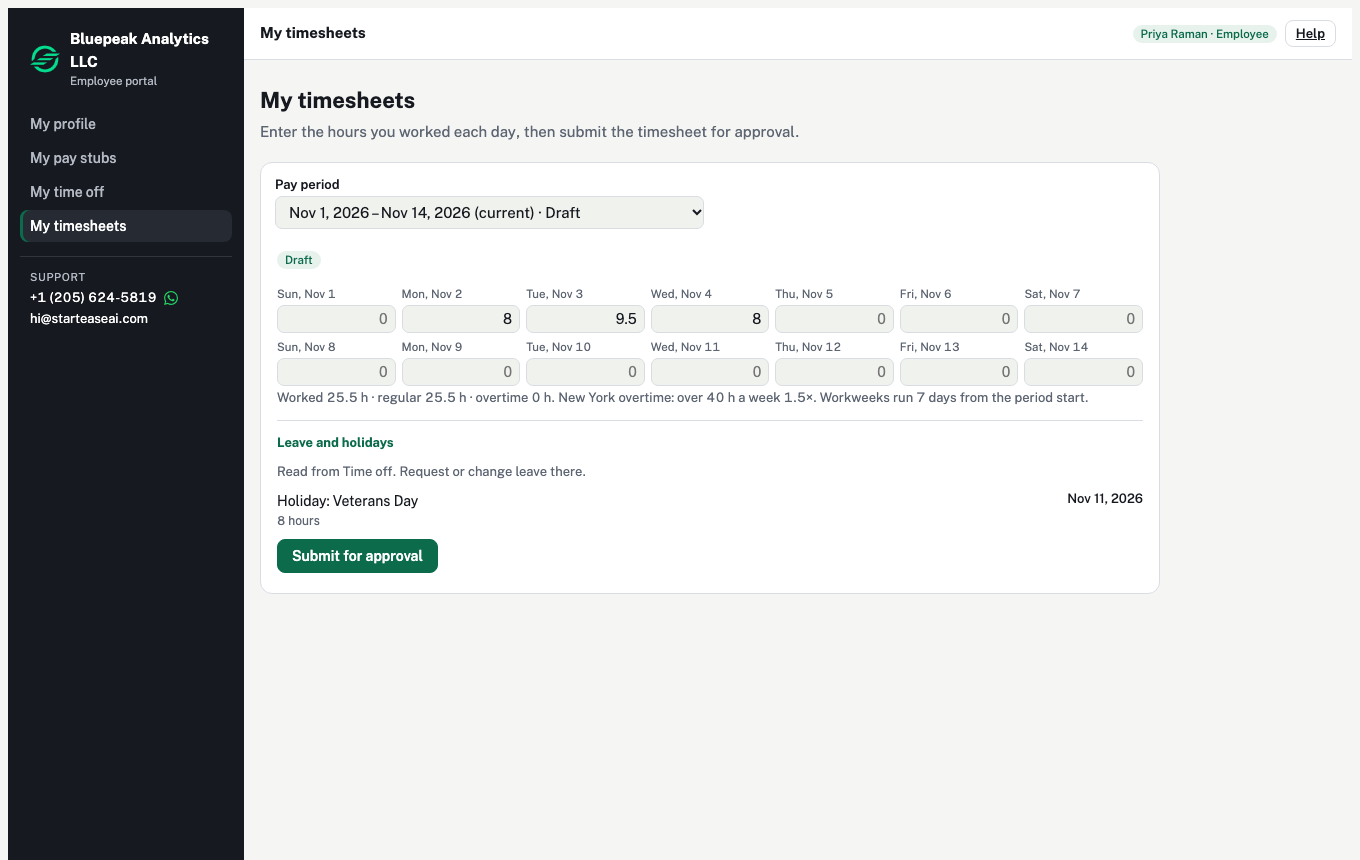
- On each covered employee's timesheet, holidays in the pay period appear under Leave and holidays with the paid hours. Nobody types them.
- For salaried employees the hours are shown as included in salary.
- When the timesheet is approved, Run payroll fills the payroll from it, holiday hours included.
Leave booked as Full days skips company holidays for employees who get holiday pay, so the same day is not paid twice. See How to record time off for an employee.
More: Time off vs timesheets.
What employees see
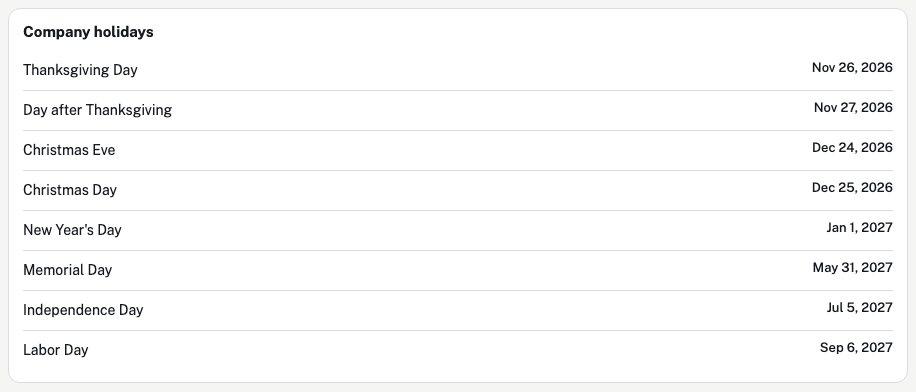
Employees who get holiday pay see a Company holidays card on My time off, with the holidays in the next 12 months.
Will the holidays update next year by themselves?
Federal holidays: yes. StartEase works out each one from its rule for every year, so on January 1 the new dates are already there. You do not need to do anything. For example, January 1, 2028 is a Saturday, so with the weekend rule on, New Year's Day is observed on Friday, December 31, 2027, and it appears on the timesheet for the pay period that includes that day.
Company holidays you add: only if Every year is ticked. Otherwise add next year's date.
Your settings carry over too: which holidays are ticked, the paid hours and who is covered.
Common questions
Do we have to observe every federal holiday?
No. Federal law does not require private employers to give paid holidays. Tick only the ones your company closes for, and write them in your handbook.
What if an employee works on a holiday?
Federal law does not require extra pay for working on a holiday. If your policy pays extra, ask your payroll team how to record it.
Can part-time employees get fewer holiday hours?
Not on the same calendar: Paid hours for each holiday is one number for everyone covered. To leave someone out, untick All employees and choose who is covered.
What if the government adds a new federal holiday?
The list of federal holidays is built into StartEase. A new one, as Juneteenth was in 2021, is added in an app update.
The Fair Labor Standards Act does not require payment for holidays or extra pay for holiday work; these are agreements between employer and employee. For exempt salaried employees, pay may not be reduced for time when the employer has no work available. Federal law (5 U.S.C. 6103) sets the public holidays for federal employees; OPM publishes the dates each year and describes the Saturday-to-Friday and Sunday-to-Monday rule.
Sources (government sites):