 StartEase
Every payroll checked against 14 laws before anyone is paid.
StartEase checks every payroll against 14 federal and state rules before it can be approved. When the law says no, the payroll stops and you see why, with the law cited.
- Minimum wage
- Exempt status
- Unemployment rates
- State income tax
- Form W-4
- Employee or contractor
- Work state
The platform reads the payroll, and gives you the error.
The checks are not a report you read afterwards. They sit in the path of every payroll.
- Step 1The payroll is preparedPay, hours, states, forms and rates are read from your company's setup.
- Step 2The platform checks itFourteen checks: wages, tax rates, forms and workers, and the state rules.
- Step 3A failed check stops itIt cannot be sent or approved. The message names the person, the rule and the law, with links to the government sources.
- Step 4You fix it and send it againThe setup is corrected and the payroll is sent again. Then the employer approves it.
Checked at three pointsWhen it is preparedWhen it is sentWhen the employer approves
The checks are only as good as the facts. So we ask for all of them.
When you sign up, we collect the company details and the state registrations that every check reads from. You enter them once. The platform lists what is still missing, and a missing unemployment rate blocks payroll approval. The screens below show a sample company with sample data.
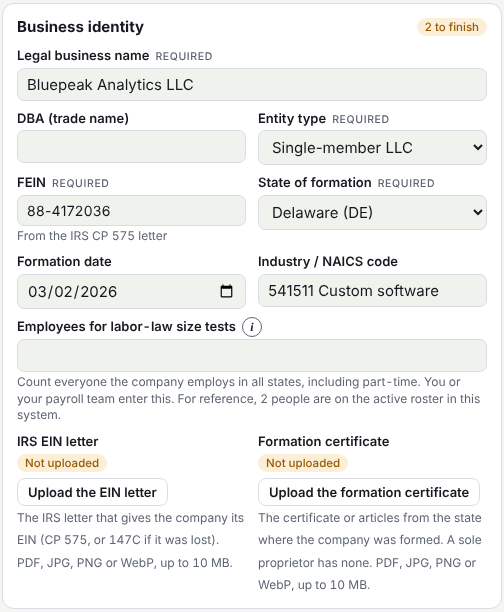
Business identity
Legal name, entity type, FEIN, where and when it was formed, industry code, and the IRS EIN letter and formation certificate.
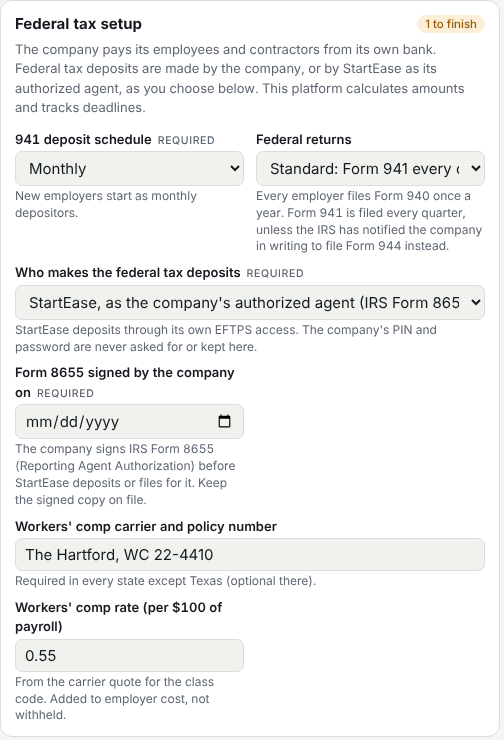
Federal tax setup
Deposit schedule, which federal return you file, who makes the federal deposits, and workers' compensation.
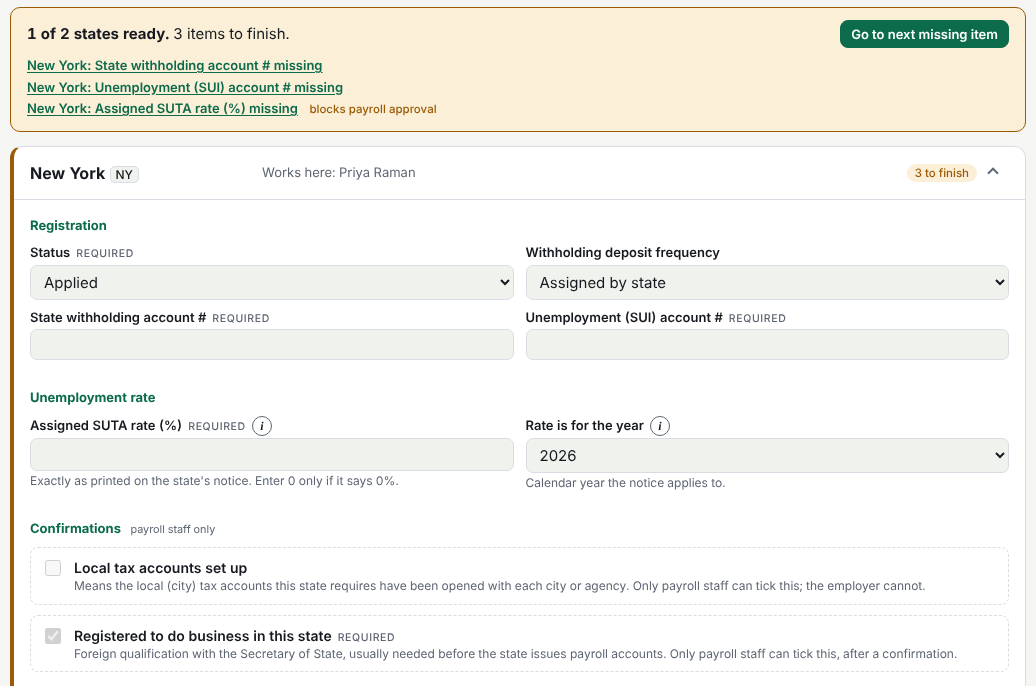
State registration
For every state where you have employees: registration status, withholding and unemployment account numbers, and the assigned rate. What is still missing is listed at the top, and the rate is marked as blocking payroll approval.
Fourteen checks. Each tied to a law.
Every payroll is checked when it is prepared, when it is sent, and when the employer approves. A failed check stops the payroll and says why.
Wages
Tax rates
Forms and workers
People and places
Read each check, with its legal basis and government links, in the help center →
The platform explains every stop, and cites the law.
A payroll below the legal minimum, in a sample company. This is what the employer sees.
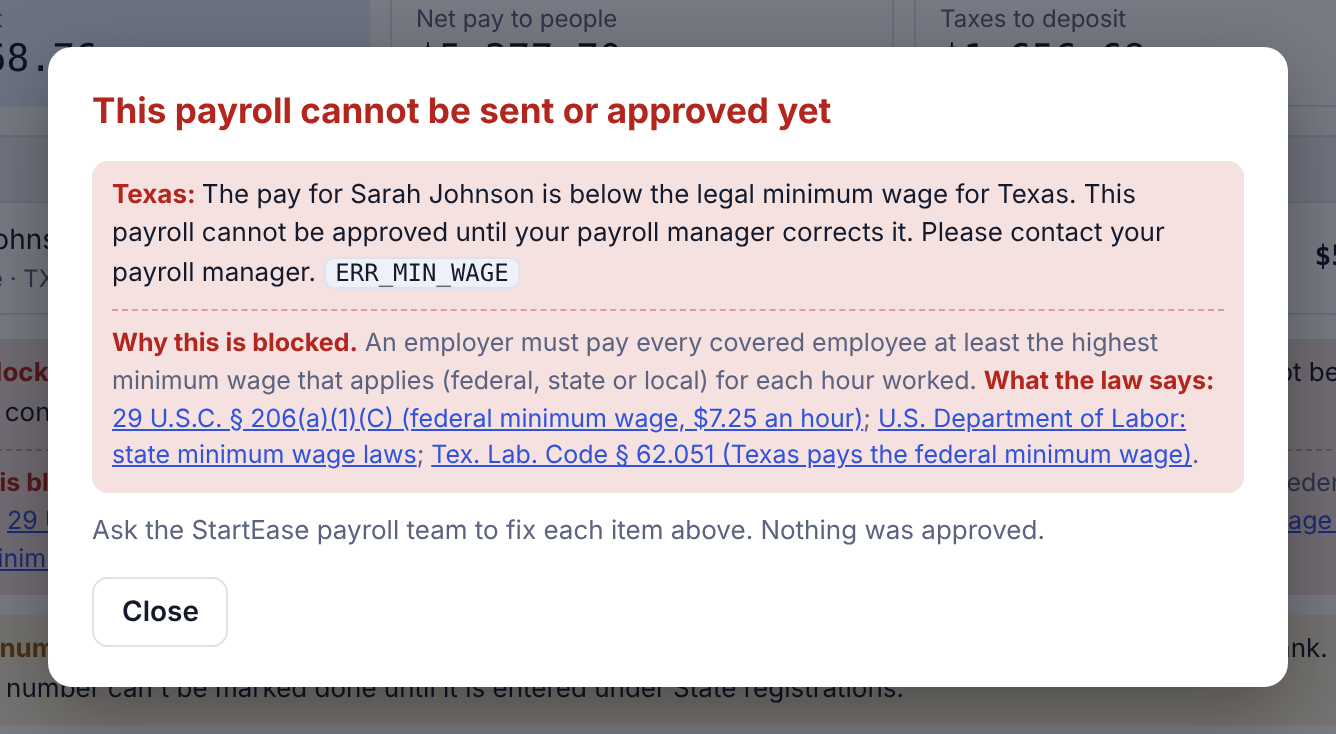
- 1What is wrongPay is below the legal minimum. The payroll cannot be sent.
- 2Why it is blockedThe highest of the federal, state and local minimum applies to every hour worked.
- 3What the law says29 U.S.C. § 206(a)(1)(C) and Tex. Lab. Code § 62.051, with links to the government sources.
- 4What happens nextThe payroll team corrects the pay and sends it again.
Other stops read the same way
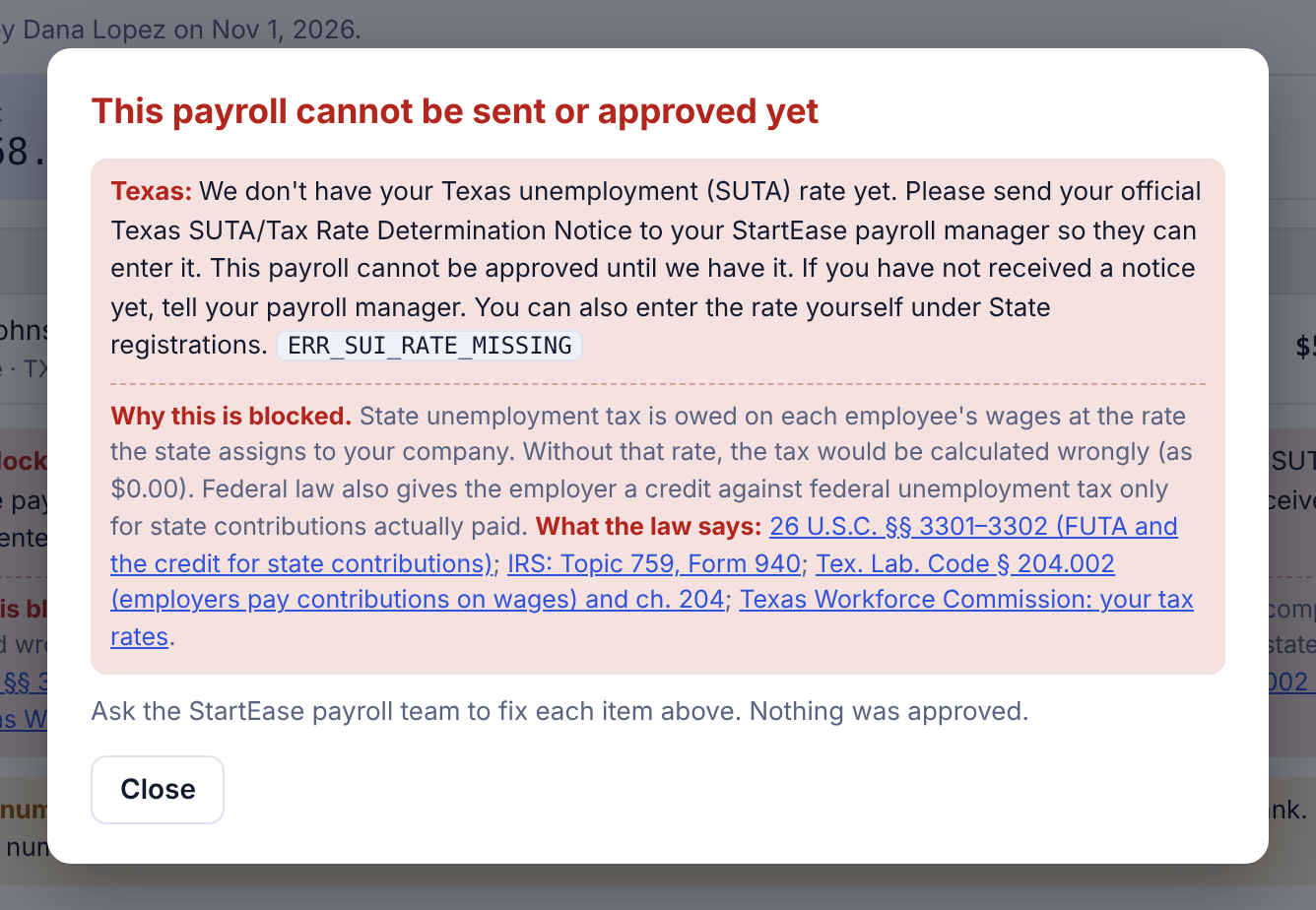
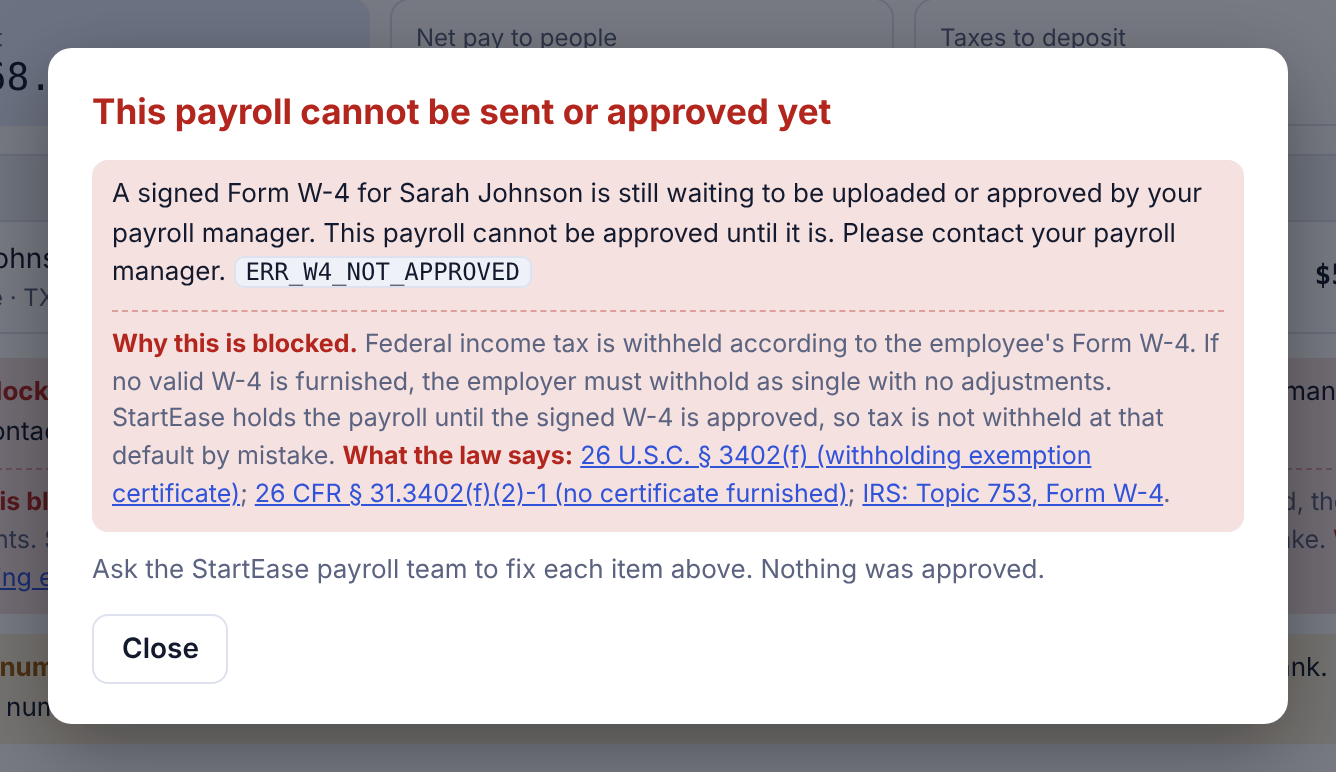
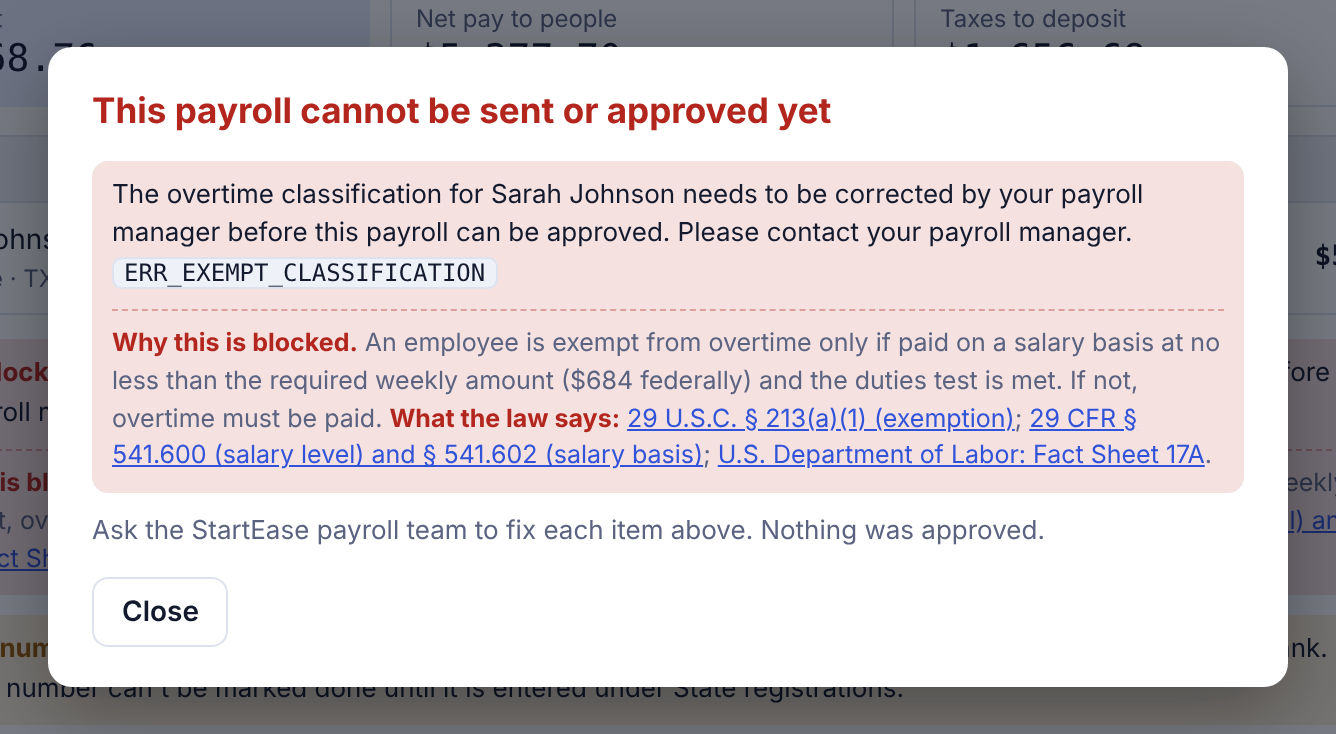
What is due, and when.
Each item has a due date and a status. Weekend and holiday dates move to the next business day.
With every payroll
Every quarter
Every January
When you hire
Payroll compliance questions.
What does StartEase check before each payroll?
Fourteen rules in four groups. Wages: minimum wage, a missing wage table, tipped pay and exempt status. Tax rates: the state unemployment rate, the new-year rate, an expired temporary rate, a payroll calculated before the rate was entered, and the state income tax rate. Forms and workers: an approved Form W-4, and the same person entered as an employee and a contractor. People and places: the work state, employees who live and work in different states, and the company size for state sick leave.
What happens when a payroll fails a check?
The payroll stops. It cannot be sent or approved. The message names the person, the rule and the law, with links to the government sources. You fix the setup and send the payroll again, then the employer approves it.
When are the checks run?
Three times: when the payroll is prepared, when it is sent, and when the employer approves it.
Which laws are the checks based on?
The wage checks follow the Fair Labor Standards Act (29 U.S.C. §§ 203, 206 and 213). The tax rate checks follow federal unemployment tax law (26 U.S.C. §§ 3301–3302) and state law. The form checks follow 26 U.S.C. § 3402(f) for Form W-4 and 26 CFR § 31.3121(d)-1 for who is an employee. The work-state and company-size checks follow state law. Each check is explained, with its government source, in the help center.
Does StartEase give legal advice?
No. The checks stop a payroll that breaks a rule and show the law behind it. For legal or HR advice, talk to an attorney or a licensed professional.
Thirty minutes, and you will know where you stand.
We go through your states, your employees, and what a first payroll looks like.
Book a meeting