 StartEase
Why can't I approve my payroll? Every message explained
StartEase refuses to approve a payroll that would be wrong. Here is what each message means and what you need to do.
What you see
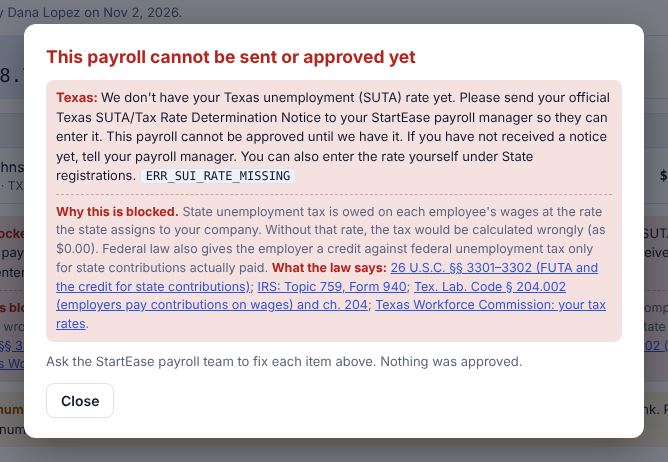
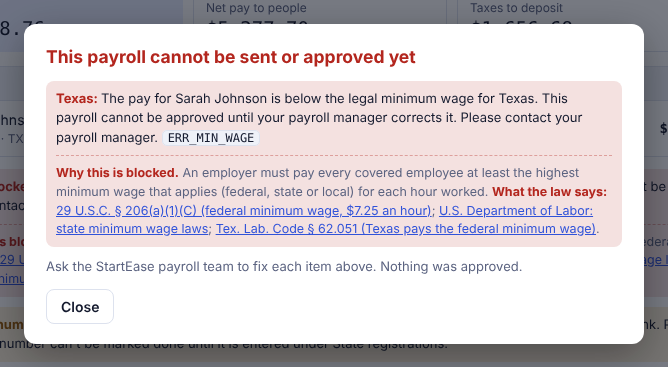
When you select Approve payroll and something is not right, a red dialog opens: This payroll cannot be sent or approved yet. Nothing is approved and nothing is changed. Each message ends with a code, such as ERR_SUI_RATE_MISSING. Quote the code when you contact your payroll manager.
You do not fix these yourself. Either you send a document, or your payroll manager changes the record. Then they send the payroll to you again.
The 14 messages
| Code | What it means | What you do |
|---|---|---|
ERR_SUI_RATE_MISSING | Your state unemployment (SUTA) rate has not been entered. | Send your official state SUTA / Tax Rate Determination Notice to your payroll manager. How |
ERR_SUI_RATE_YEAR | Only last year's rate is on file and this payroll is dated in the new year. | Send the new year's notice. If it has not arrived, tell your payroll manager; they may be able to use last year's rate for a short time. |
ERR_SUI_PLACEHOLDER_EXPIRED | The temporary last-year rate has ended (it lasts 60 days). | Send the new year's notice now. |
ERR_MIN_WAGE | Someone is paid below the legal minimum wage. | Contact your payroll manager to correct the pay. How the minimum is checked |
ERR_MIN_WAGE_TABLE | The StartEase team needs to finish a minimum wage setup item. | Contact your payroll manager. Nothing is wrong with your pay. |
ERR_TIP_CREDIT | A tipped employee's cash wage plus tips does not reach the full minimum. | Contact your payroll manager. They add make-up pay or enter the tips actually received. |
ERR_W4_NOT_APPROVED | An employee's signed Form W-4 is not uploaded or approved yet. | Ask the employee to upload it under My profile. Your payroll manager approves it. |
ERR_EXEMPT_CLASSIFICATION | An employee marked "exempt from overtime" does not meet the pay rules. | Contact your payroll manager. The person is either made non-exempt (overtime is paid) or the salary is corrected. |
ERR_MULTI_STATE_UNCONFIRMED | An employee lives in one state and works in another, and the tax treatment is not confirmed. | Contact your payroll manager to confirm it. |
ERR_DUAL_CLASSIFICATION | The same person is entered as both an employee and a contractor. | Contact your payroll manager. A person is one or the other. |
ERR_HEADCOUNT_MISSING | Your state's paid sick leave rules depend on company size, and your total number of employees is not entered. | Tell your payroll manager your total number of employees, all states, including part-time. |
ERR_WORK_STATE_MISSING | An employee has no work state. | Shown as "needs to finish a setup item". Contact your payroll manager. |
ERR_SIT_RATE_MISSING | A state income tax rate is missing on the StartEase side. | Shown as "needs to finish a setup item". Contact your payroll manager. |
ERR_SUI_STALE | The payroll was calculated before your rate was entered. | Your payroll manager withdraws and resends it. |
Why each block exists and what the law says
Each block comes from a law or from a StartEase control that protects you from a wrong payroll. Where a law applies, the links go to government sites.
Unemployment rate
Why StartEase blocks it. State unemployment tax is owed on each employee's wages at the rate the state assigns to your company. Without that rate, the tax would be calculated wrongly (as $0.00). Federal law also gives the employer a credit against federal unemployment tax only for state contributions actually paid.
Sources (government sites):
Minimum wage
Why StartEase blocks it. An employer must pay every covered employee at least the highest minimum wage that applies (federal, state or local) for each hour worked.
Sources (government sites):
Tipped employee
Why StartEase blocks it. An employer may pay a tipped employee a lower cash wage (at least $2.13 federal) only if cash wages plus tips reach the full minimum wage. If they do not, the employer must pay the difference.
Sources (government sites):
Exempt classification
Why StartEase blocks it. An employee is exempt from overtime only if paid on a salary basis at no less than the required weekly amount ($684 federally) and the duties test is met. If not, overtime must be paid.
Sources (government sites):
Form W-4
Why StartEase blocks it. Federal income tax is withheld according to the employee's Form W-4. If no valid W-4 is furnished, the employer must withhold as single with no adjustments. StartEase holds the payroll until the signed W-4 is approved, so tax is not withheld at that default by mistake.
Sources (government sites):
Employee and contractor
Why StartEase blocks it. The law decides whether someone is an employee or an independent contractor from the facts, mainly who has the right to control how the work is done. The same person should not be reported on both a W-2 and a 1099 for the same work, so StartEase holds the payroll until compliance decides.
Sources (government sites):
Lives in one state, works in another
Why StartEase blocks it. No single federal rule decides which state's income tax is withheld when an employee lives in one state and works in another. It depends on both states' laws and any agreement between them, so StartEase asks a person to confirm it.
No single statute decides this. It is a StartEase control.
Company size
Why StartEase blocks it. State paid sick leave laws set accrual and yearly limits by company size. StartEase needs your total number of employees to apply the right rule. Texas and Wyoming have no paid sick leave law, so this block applies only where a state has one.
No single statute decides this. It is a StartEase control.
Work state
Why StartEase blocks it. State tax, state unemployment tax and the minimum wage all depend on the state where the work is done. StartEase cannot calculate a payroll without it.
No single statute decides this. It is a StartEase control.
State income tax rate
Why StartEase blocks it. A state with an income tax requires withholding. If StartEase has no withholding rate for that state, it would withhold $0.00, so it stops until the rate is set from the state's official tables.
No single statute decides this. It is a StartEase control.
Who to contact
Your StartEase payroll manager. Send the code and the message. Most blocks are cleared the same day once the missing document or setting is in.