 StartEase
Fill in your Form W-4 in StartEase, box by box
Your W-4 tells your employer how much federal income tax to take from each paycheck. This guide walks through the Form W-4 section in My profile, one box at a time: what each box means and what to type.
Before you start
You need your signed 2026 Form W-4 (the paper or PDF form from the IRS). In StartEase you copy what you wrote on it, then upload the signed form. If you have not filled one in yet, the IRS Tax Withholding Estimator at irs.gov/W4App can help you decide what to write.
Open My profile and scroll to Form W-4. Go through it from top to bottom.
| If this is you | In StartEase you fill in |
|---|---|
| One job, no children, no other income | Only the filing status and the date you signed, then upload the form. |
| You have children or other dependents | Also tick I filled in Step 3 or Step 4 on my W-4 and type how many. |
| You have two jobs, or your spouse works | Also look at Step 2(c) box is checked. |
1. Filing status
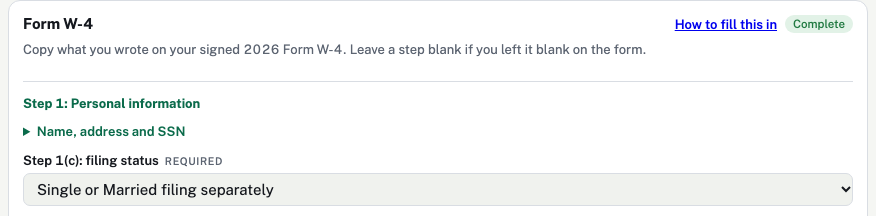
| Box | What it means | What to do |
|---|---|---|
| Name, address and SSN | Your details from Personal and Home address. You cannot change them here. | Click it to check they match your W-4 and your Social Security card. |
| Step 1(c): filing status | How you will file your tax return. | Choose the same box you ticked on your W-4:
|
2. Two jobs, and the switch for Steps 3 and 4
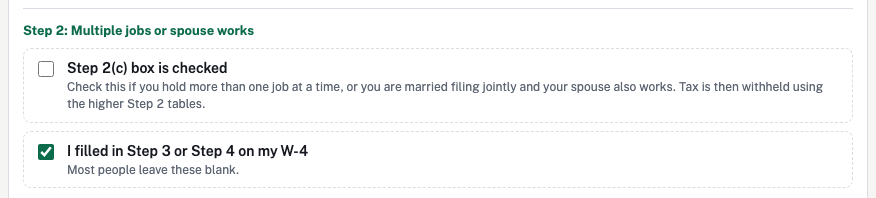
| Box | What it means | What to do |
|---|---|---|
| Step 2(c) box is checked | You have exactly two jobs in total (yours, or yours and your spouse's), and you ticked box 2(c) on your W-4. | Tick it only if you ticked 2(c) on your W-4. One job? Leave it blank. |
| I filled in Step 3 or Step 4 on my W-4 | Your W-4 has an amount for children, other income, deductions or extra tax. | Tick it if your W-4 has any amount in Step 3 or Step 4. The boxes for those steps then appear. Most people leave it blank. |
3. Children and other dependents
You see this part only after ticking I filled in Step 3 or Step 4 on my W-4.
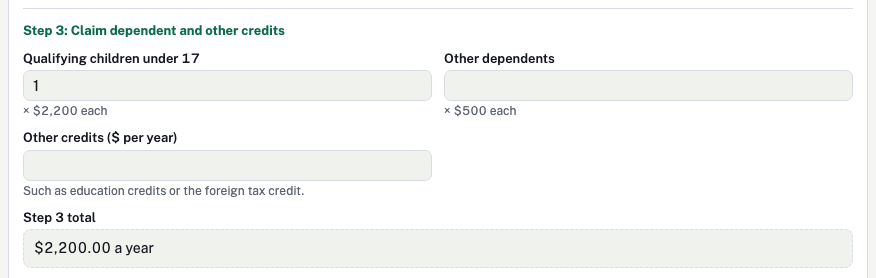
| Box | What it means | What to type |
|---|---|---|
| Qualifying children under 17 | Children under 17 you will claim on your tax return. | How many, for example 2. Not a dollar amount: StartEase multiplies by $2,200. |
| Other dependents | Other people you support and claim, for example an older child or a parent. | How many, for example 1. StartEase multiplies by $500. |
| Other credits ($ per year) | Other tax credits you included on your W-4, such as education credits. | The dollar amount for the year, or leave blank. |
| Step 3 total | Worked out by StartEase. | Nothing to type. Check it matches line 3 on your W-4. |
These boxes lower the tax taken from each paycheck.
4. Other income, deductions and extra tax
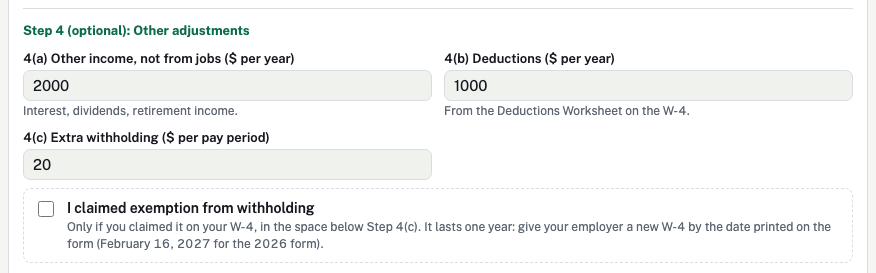
| Box | What it means | What to type |
|---|---|---|
| 4(a) Other income, not from jobs ($ per year) | Income with no tax taken out, such as interest, dividends or a pension. Not other jobs. | The yearly amount from 4(a) on your W-4, or leave blank. It raises the tax taken. |
| 4(b) Deductions ($ per year) | Deductions above the standard deduction that you worked out on the W-4's Deductions Worksheet. | The yearly amount from 4(b) on your W-4, or leave blank. It lowers the tax taken. |
| 4(c) Extra withholding ($ per pay period) | Extra tax you asked to have taken from every paycheck, for example to avoid a bill at tax time. | The amount per paycheck from 4(c) on your W-4, for example 20, or leave blank. |
| I claimed exemption from withholding | No federal income tax is taken from your pay at all. Only for people who owed no federal income tax last year and expect to owe none this year. | Tick it only if you claimed exemption on your W-4. Most people leave it blank. |
5. Sign and upload
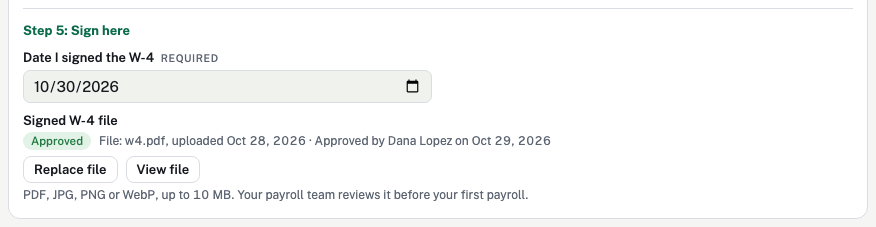
| Box | What it means | What to do |
|---|---|---|
| Date I signed the W-4 | The date next to your signature on the W-4. | Pick that date. |
| Signed W-4 file | A copy of your signed W-4 for your payroll team to check. | Select Upload signed W-4 and choose a photo or scan of the signed form (PDF, JPG, PNG or WebP, up to 10 MB). Unsigned forms are not valid. |
What happens next
| Status | Meaning |
|---|---|
| No file uploaded | Upload your signed form. |
| Waiting for review | Your payroll team is checking the file against your entries. |
| Approved | It shows who approved it and when. Your pay can be processed. |
| Rejected | A note says why. Fix it and upload a corrected form. |
Your first payroll cannot be approved until your W-4 is approved. If you replace the file later, the new file must be approved again.
If you do not give a W-4
Your employer must withhold as if you are single, with no other entries. That can take more tax than you need. Giving a W-4 fixes it.
Changing your W-4 later
- Give a new W-4 any time your life changes, for example a new job, marriage, or a child. Fill in a new form, update the boxes above and upload it.
- Your employer must use a new W-4 no later than the start of the first payroll period ending on or after the 30th day after receiving it.
- If you claimed exemption, it lasts one year. The 2026 form asks for a new W-4 by February 16, 2027.
Federal law requires the employer to withhold income tax according to the employee's Form W-4. If an employee does not furnish a valid W-4, the employer must withhold as single with no adjustments. The amounts and conditions above ($2,200 per child, $500 per other dependent, exemption, February 16, 2027) are from the IRS 2026 Form W-4 and its instructions. StartEase holds the payroll until your signed W-4 is approved so tax is not taken at that default by mistake.
Sources (government sites):