 StartEase
Help / Employees
Download your pay stubs
How to open a pay stub, save it as a PDF, or print it.
- Sign in and open My pay stubs.
- Find the pay date and select View. The pay stub opens above the list.
- Select Download PDF to save it, or Print to print it or save it as a PDF from your printer dialog.
- Select Close payslip when done.
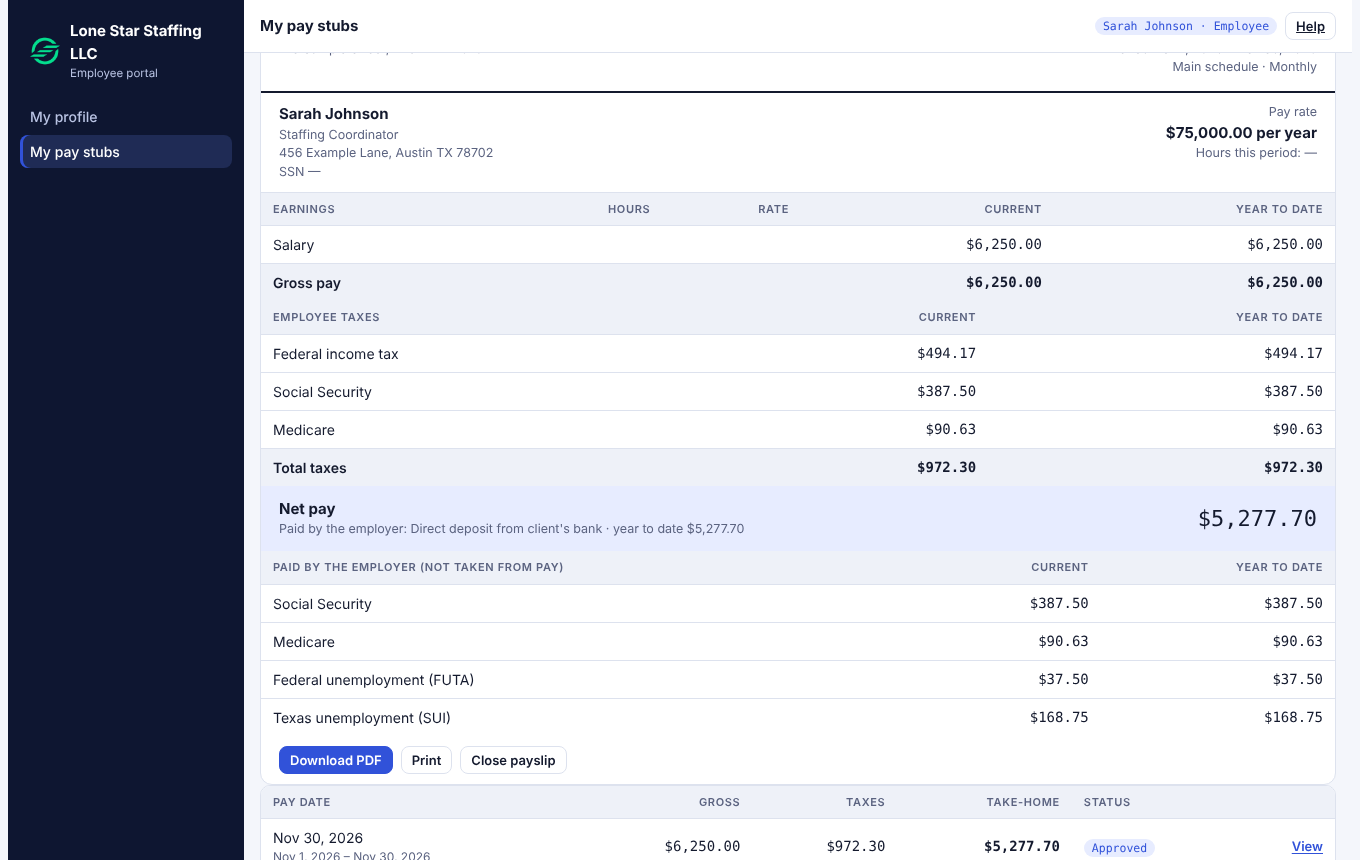
What is on it
| Part | Meaning |
|---|---|
| Earnings | Your pay for the period and for the year so far. |
| Employee taxes | Federal income tax, Social Security and Medicare taken from your pay. |
| Net pay | What you receive. Your employer pays you from its own bank. |
| Paid by the employer | Taxes your employer pays on top of your pay. They are not taken from you. |
If the PDF does not download
Some browsers block downloads. Use Print and choose Save as PDF.
If a figure looks wrong
Tell your employer. Approved payrolls are locked, so corrections are made in a later payroll by the payroll team.
Next: Get your Form W-2