 StartEase
Payroll that checks the law before anyone is paid.
Run payroll yourself for $60 a month, with every payroll checked against 14 federal and state rules. Or choose Managed payroll, and a dedicated payroll manager registers you in each state and runs payroll for you.
All 50 states and DC, one price. The platform does not pay your employees or contractors. You pay your people from your own bank.
- State unemployment registration
- Federal tax deposits
- New-hire reports
- Form I-9
- Minimum wage and overtime
- Agency notices
Run payroll yourself, or have us run it.
Per company, per month. No setup fee, cancel any time.
Payroll software
Up to 5 employees, then $5 per additional employee. One price for every state: all 50 states and DC, no extra charge for more states. Every federal and state tax form prepared, with its due date.
- All 14 payroll checks
- Unlimited payrolls, including off-cycle runs
- Employer and employee portals
- No setup fee
Managed payroll
A dedicated payroll manager runs payroll for you. You approve every payroll. Billed by the hour for the work done each month, not a fixed monthly fee.
- Everything in Payroll software
- State payroll registration in each state where you have employees
- Federal and state payroll returns filed for you, with your authorization
- Agency notices explained and replies prepared
See what you and your employees will use.
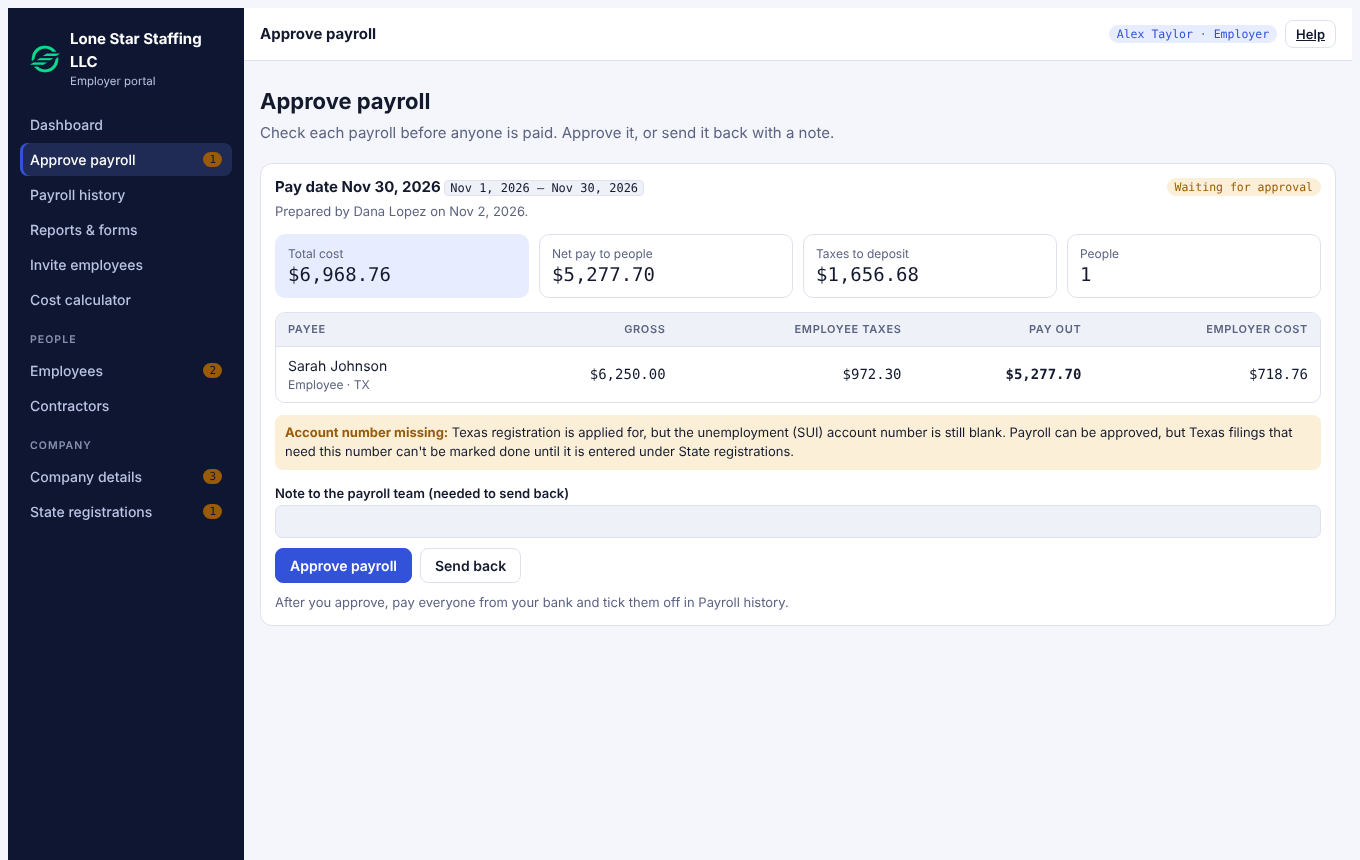
Approve each payroll before anyone is paid
- Total cost, net pay and taxes to deposit on one screen
- Warnings show before you approve
- Approve, or send it back with a note
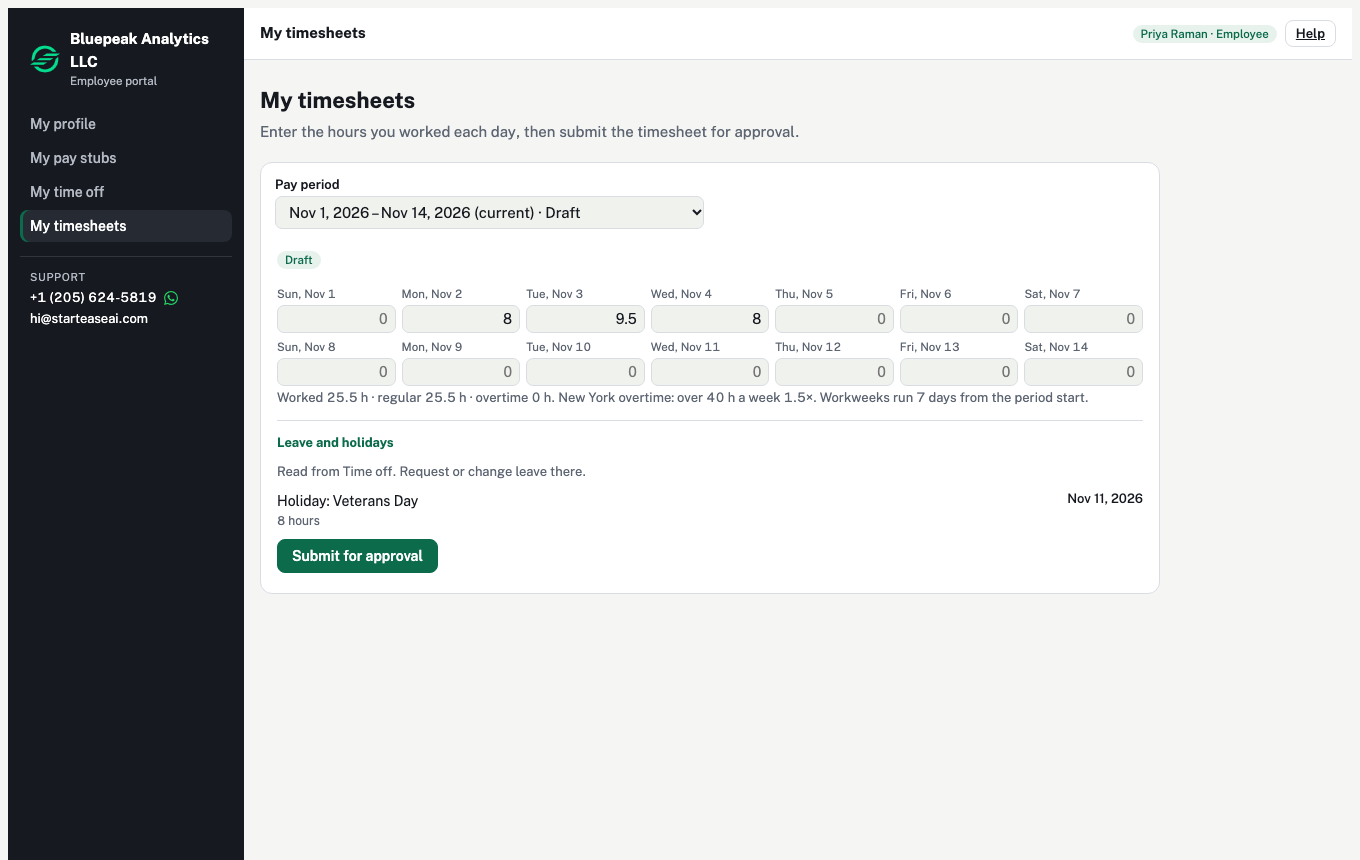
Employees log hours, ask for leave and see their pay
- Enter hours and submit the timesheet
- Ask for time off and see balances
- Pay stubs, W-4, I-9 and bank details
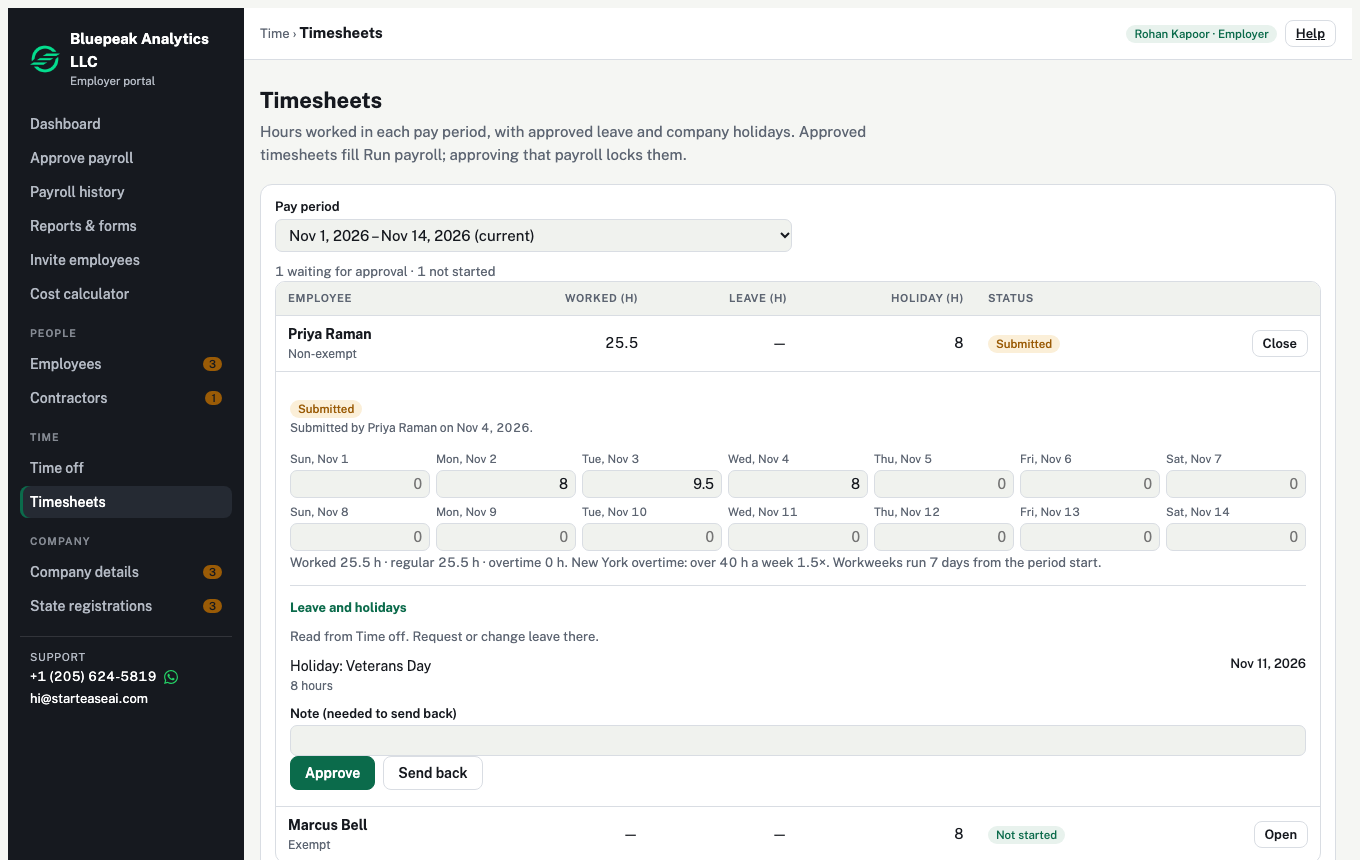
Approve hours before they reach payroll
- Hours, leave and holidays for each employee
- Overtime worked out for the work state
- Approved timesheets fill the payroll
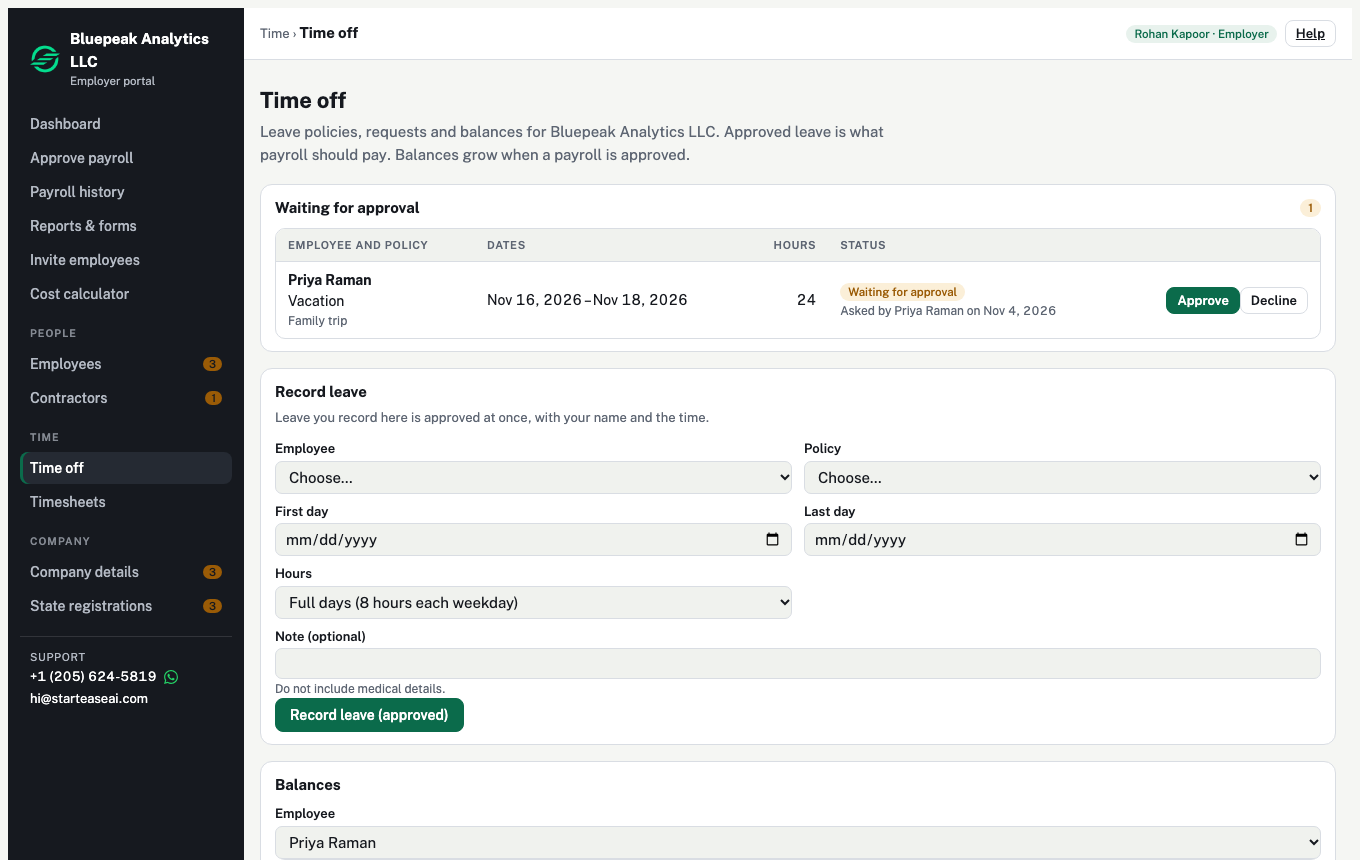
Approve leave in one click
- Requests show the dates, hours and reason
- Approved leave is what payroll pays
- Balances grow with each approved payroll
Got an IRS or state notice? We will help you read it, free.
For any small business, whether or not you use StartEase. A notice is easy to misread and costly to ignore. Send it to us, and a payroll specialist tells you in plain words what it means, what to do and by when.
- Send a photo or the PDFNo account and no sign-up needed.
- Get a plain-words answerWhat the notice means, what to do, and the reply date.
- Get help with the correctionWe help you file the right correction with the agency.
Free help to understand a payroll notice. It is not tax or legal advice.
What does a salary really cost the company?
Enter a salary and a work state. See the payroll taxes the company pays on top, and what the employee takes home, with the 2026 federal and state rates the platform uses.
Free, no sign-in. It runs in your browser and sends nothing.
| Salary | $75,000.00 |
| Social Security (6.2%) | $4,650.00 |
| Medicare (1.45%) | $1,087.50 |
| Federal unemployment (FUTA) | $42.00 |
| Texas unemployment (2.7%) | $243.00 |
| Company pays | $81,022.50 |
| Employee takes home | $61,592.50 |
An estimate, not tax advice. Your own unemployment rate is on the state's notice.
See how it works.
Four pages, each answers one question.
Before you book.
How much does StartEase cost?
Payroll software is $60 a month for up to 5 employees, then $5 a month for each employee after that. W-2s and 1099-NECs are $10 each at year end. There is no setup fee. Managed payroll is billed by the hour for the work done each month. See pricing.
Which states do you cover?
All 50 states and DC, at one price. There is no extra charge for employees in more than one state.
I’m afraid one payroll mistake will bring a penalty. How do you help?
Every payroll is checked against 14 federal and state rules, and a payroll that breaks one is stopped before anyone is paid. This is on both plans.
How do I know what is due, and when?
Federal tax deposits, Form 941 every quarter, Form 940 (FUTA) once a year, state unemployment (SUTA) and withholding reports, new-hire reports, and W-2, W-3 and 1099-NEC forms at year end are prepared from your payrolls, in all 50 states and DC. One calendar shows every due date, what was paid and the confirmation number. This is on both plans.
Will I still spend payday chasing timesheets and approvals?
No. Employees fill in their own timesheets on both plans. On Managed payroll, your payroll manager also chases the missing ones.
What about the forms for a new hire?
New hires fill in their own W-4, I-9 and bank details online, and you review what they entered. This is on both plans.
We have staff in a new state. Where do we start?
On Managed payroll, we register you for that state’s payroll tax and unemployment accounts.
I already pay an outside person and still do half the work. What is different?
On Managed payroll, one dedicated payroll manager runs your payroll from start to finish, and you only approve. On Payroll software, you run payroll yourself, with the same checks, forms and calendar.
Do you pay my employees?
No. StartEase does not pay your employees or contractors. You pay them from your own bank, then mark people paid. Tax deposits are separate: on Managed payroll, StartEase can make them for you as your authorized agent (IRS Form 8655). Otherwise you deposit from your own EFTPS account.
Do you file my taxes?
On Payroll software, you file and pay from your own accounts, using the forms the platform prepares, and it keeps your records and receipts. On Managed payroll, we file your federal returns once you sign IRS Form 8655, and your state returns once you sign the authorization each state requires.
A letter from the IRS or the state arrived. What do I do?
Send us a photo or a PDF of the notice. We read it against your setup and tell you in plain words what it means and what to do, on both plans. On Managed payroll, we also prepare the reply.
How do I get access?
Book a meeting. Accounts are created by invitation. Tell us where your employees work and we confirm your states with you.
Where can I read the rules?
Every check, with its legal basis and government links, is in the help center.
Learn StartEase in 12 short videos.
From your invitation email to your first payroll, pay stubs and time off, in the order a new company uses it. Each video links to the written guide.
Watch the video guides →Payroll law, explained
Short videos on payroll law and compliance for employers. We add new ones here as we make them.
Thirty minutes, and you will know where you stand.
We go through your states, your employees, and what a first payroll looks like.
Book a meeting