 StartEase
Fill in your profile and Form W-4
What to enter when you start, how to upload your signed W-4, and when your employer needs it.
After you accept your invitation, open My profile. Your employer uses your answers to pay you correctly. Each section shows Complete or N to finish.
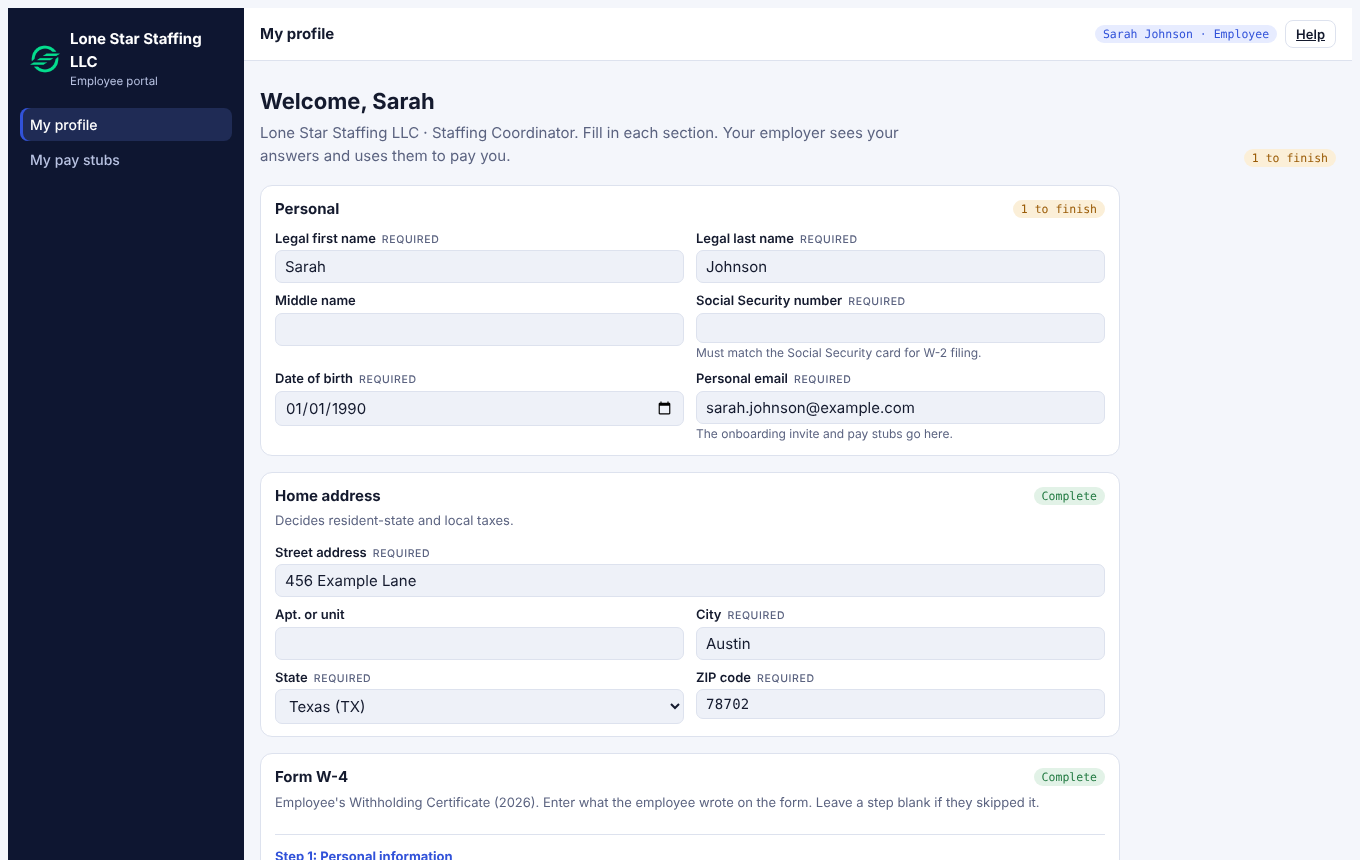
Personal
Legal name, Social Security number (it must match your Social Security card, because it is used on your W-2), date of birth and personal email. Your SSN is stored encrypted.
Home address
This decides your resident state and local taxes. If you live in a different state from where you work, your payroll manager confirms how state tax is taken.
Form W-4
See Form W-4: what it is and how it is approved. In short: the W-4 tells your employer how much federal income tax to withhold: filing status, other jobs, dependents, other income, deductions and extra withholding. Fill in each step as it is on your form; you can skip a step you skipped on paper.
- Enter the steps from your W-4.
- Enter the date you signed.
- Under Signed W-4 file, upload a PDF, JPG, PNG or WebP (up to 10 MB). Check the file matches what you entered.
- Your payroll team reviews it. The status reads Waiting for review, then Approved.
Your employer cannot run payroll for you until the signed W-4 is approved. If it is rejected, there is a note: upload a corrected form. If you replace the file later, it needs to be approved again.
Form I-9, Section 1
See Form I-9: what to fill in and what to bring.