 StartEase
Learning and development leave policy: what it is and how to set it up
What learning and development leave is, when training time counts as work time under federal rules, and how to set up a learning leave policy in StartEase block by block.
What is a learning and development leave policy?
Learning and development leave gives employees time off for a course, exam or training they choose to take.
Why companies offer it
- People grow skills the company can use.
- It helps keep ambitious staff.
- A yearly allowance makes it fair and easy to plan.
What the law says, in short
Federal rules say training time need not be counted as working time only if all four are true: it is outside regular hours, truly voluntary, not directly related to the job, and no productive work is done. Training you require, or that is directly related to the job, is generally work time and is paid as hours worked, not as leave.
How to set up a learning and development policy in StartEase
- Open Time › Time off and scroll to Policies.
- Under Add a policy, choose Learning and development, then select Add policy.
- Fill in each block below. The example is a sample "Learning day" policy: your company chooses its own numbers.
- In Review and turn on, read the summary sentence and select Turn on this policy.
Basics
The name, the kind of leave, whether it is paid, and what employees read about it. More on this block.
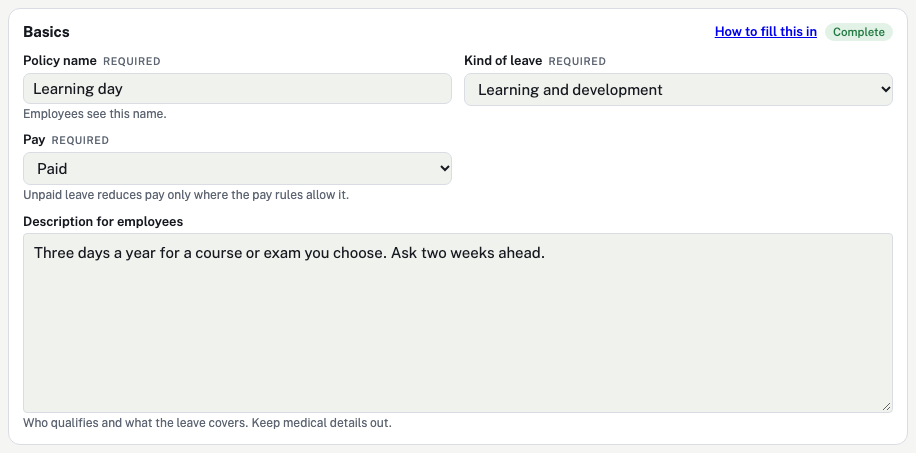
| Box | What it means | In this example |
|---|---|---|
| Policy name | The name employees see when they ask for time off and on their balances. Required. | "Learning day" |
| Kind of leave | What the leave is for. It picks the help link and the extra checks. It does not change how the balance is counted. Required.
| Learning and development |
| Pay | Whether the hours are paid. Required.
| Paid |
| Description for employees | Up to 600 characters on My time off: who qualifies and what the leave covers. Keep medical details out. | "Three days a year for a course or exam you choose. Ask two weeks ahead." |
Earning
How the balance grows. Nothing is earned until a payroll is approved. More on this block.
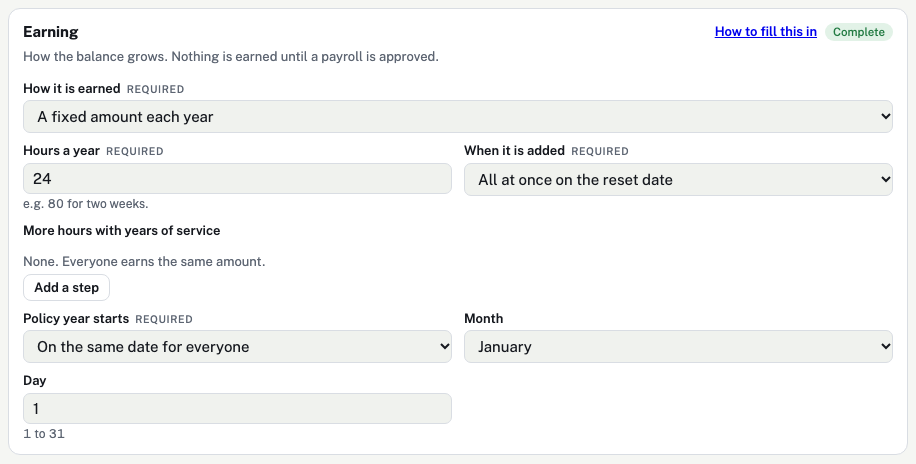
| Box | What it means | In this example |
|---|---|---|
| How it is earned | How the balance grows. Required.
| A fixed amount each year |
| Hours a year | Only for "A fixed amount each year". For example 80 for two weeks. | 24 Three 8-hour days a year. |
| When it is added | Only for "A fixed amount each year".
| All at once on the reset date The days are there on January 1. |
| More hours with years of service | Only for "A fixed amount each year". Select Add a step, then type the years and the new hours a year, for example 3 years: 120 hours a year. Remove deletes a step. | None |
| Policy year starts | When caps and carryover are counted again. Not shown for unlimited policies.
| On the same date for everyone |
| Month | Only for "On the same date for everyone". January to December. | January |
| Day | Only for "On the same date for everyone". 1 to 31. A day past the end of the month uses the last day. | 1 |
Rules
Waiting periods, negative balances, a yearly use limit and payout at exit. More on this block.
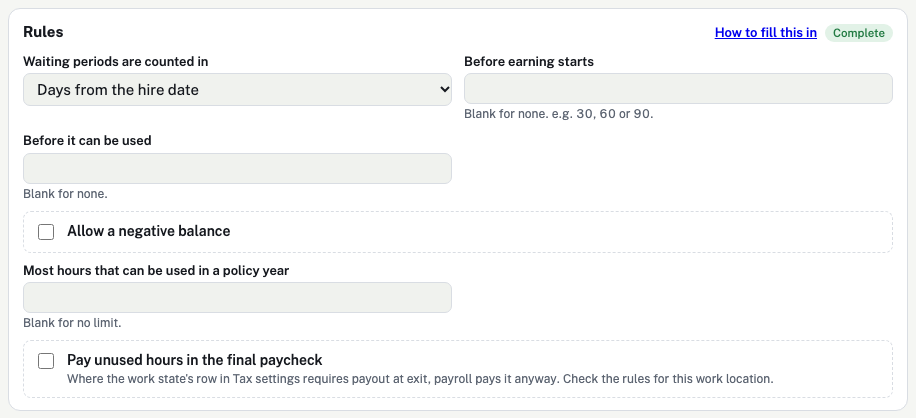
| Box | What it means | In this example |
|---|---|---|
| Waiting periods are counted in | The unit for the two waiting periods below.
| Days from the hire date |
| Before earning starts | Not shown for unlimited policies. Nothing is earned before this. Blank for none. | Blank |
| Before it can be used | Leave can be earned but not taken before this. Blank for none. | Blank |
| Allow a negative balance | Not shown for unlimited policies. Ticked: an employee may borrow ahead of what they have earned. | Unticked |
| Most hours that can be used in a policy year | A yearly limit on hours taken. Blank for no limit. | Blank |
| Pay unused hours in the final paycheck | Not shown for unlimited policies. Ticked: unused hours are paid when someone leaves. Where the work state's rule requires payout, payroll pays it whatever you choose. | Unticked |
Caps
Limits on the balance. Not shown for unlimited policies. More on this block.
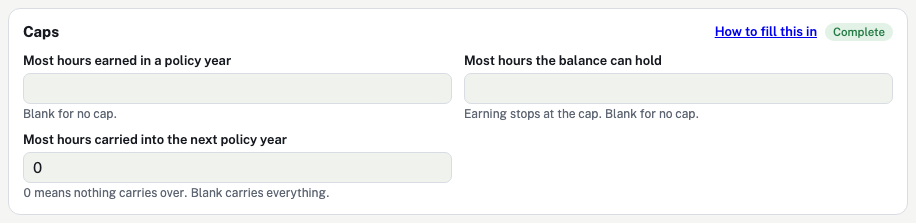
| Box | What it means | In this example |
|---|---|---|
| Most hours earned in a policy year | Earning stops for the year at this number. Blank for no cap. | Blank |
| Most hours the balance can hold | Earning pauses while the balance is at the cap and starts again when leave is used. Blank for no cap. | Blank |
| Most hours carried into the next policy year | Hours above this are dropped when a new policy year starts. 0 means nothing carries over. Blank carries everything. | 0 Use them within the year. |
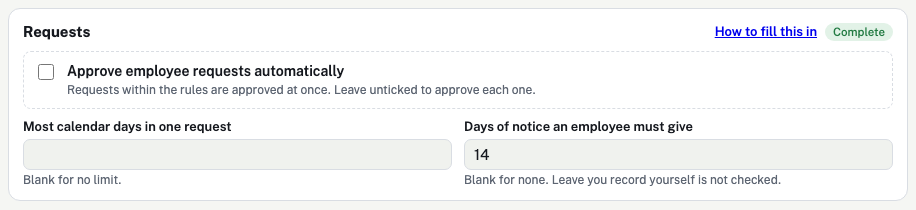
Requests
How employee requests are handled. More on this block.
| Box | What it means | In this example |
|---|---|---|
| Approve employee requests automatically | Ticked: a request that follows the rules is approved at once. Unticked: the Employer or payroll team approves each one. | Unticked |
| Most calendar days in one request | For example 10. Blank for no limit. | Blank |
| Days of notice an employee must give | For example 3 means the first day must be at least 3 days away. Leave you record yourself is not checked. Blank for none. | 14 Two weeks lets the team plan cover. |
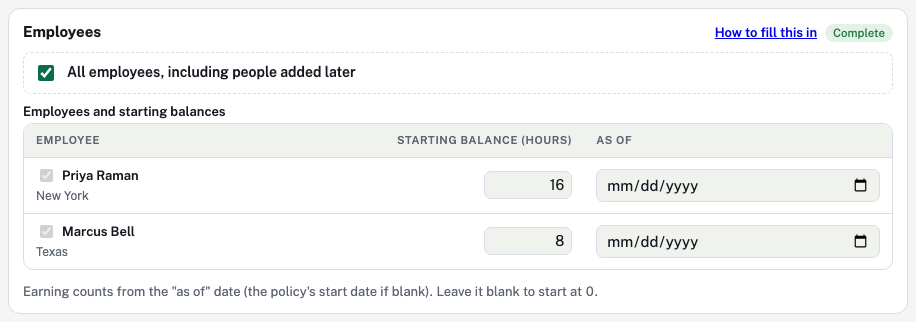
Employees
Who the policy covers and where each balance starts. More on this block.
| Box | What it means | In this example |
|---|---|---|
| All employees, including people added later | Ticked: everyone is covered, now and later. Unticked: tick each employee in the table. | Ticked |
| Starting balance (hours) | Hours the employee already has, for example from your old system. Blank starts at 0. | Sample balances |
| As of | The date that starting balance is correct. Earning counts from this date, or from the policy's start date if blank. | Blank |
Review and turn on
The last check before employees can use the policy. More on this block.

| Box | What it means | In this example |
|---|---|---|
| Ready, or "N to finish" | Ready means every required box is filled. "2 to finish" means two boxes marked Required are empty. | |
| The summary sentence | The policy in one line, for example "Paid. 80 hours a year, spread over each paycheck". Read it before you turn the policy on. | |
| Turn on this policy / Turn off | Turns the policy on for the employees covered, or off. A new policy starts turned off. | |
| Delete this policy | Only while no leave has been recorded on it. After that you can turn it off but not delete it. |
Common questions
Should required training go on this policy?
No. Training the company requires is generally work time. Pay it as hours worked on the timesheet.
Can the policy pay for the course fees?
No. This policy only tracks time off. Pay fees as a reimbursement.
Federal rules say training time need not be counted as working time only if all four are true: it is outside regular hours, truly voluntary, not directly related to the job, and no productive work is done. Training you require, or that is directly related to the job, is generally work time and is paid as hours worked, not as leave.
Sources (government sites):