 StartEase
Help / Accounting firms
Accounting and CPA firms: how firm access works
An accounting or CPA firm can manage its own client companies on StartEase. Your firm runs payroll, the Employer approves it, and StartEase still does the compliance work.
Who does what
- Firm owner: adds the firm's client companies, invites firm staff and Employers, and chooses which companies each staff member works on. The firm owner works on every company in the firm.
- Firm staff: run payroll for the companies the firm owner gives them. They cannot add companies or change who has access.
- Employer: the business owner at each client company. They approve or send back each payroll, mark people paid, and see their own company's history, taxes and reports.
- Employees: fill in their own profile, Form W-4 and Form I-9 Section 1, and see their own pay stubs.
- StartEase: does the compliance work for each company: state registrations, filings, deposits and agency notices. Every payroll is still checked against the same 14 federal and state rules before it can be approved.
Note. StartEase works out pay, taxes and reports. It does not pay employees or contractors. Each company pays its people from its own bank.
What your firm sees
- Only your own firm's companies. A firm person cannot be added to a company outside the firm.
- Inside a company, the same pages a StartEase payroll admin uses: Dashboard, Compliance center, Employees, Contractors, Time off, Timesheets, Run payroll, Payroll history, Reports & forms, Cost calculator, Company details and State registrations.
- A Social Security number or contractor tax ID shows as on file with its last 4 digits. You can type a new one, but you cannot read the full number back.
Where you start
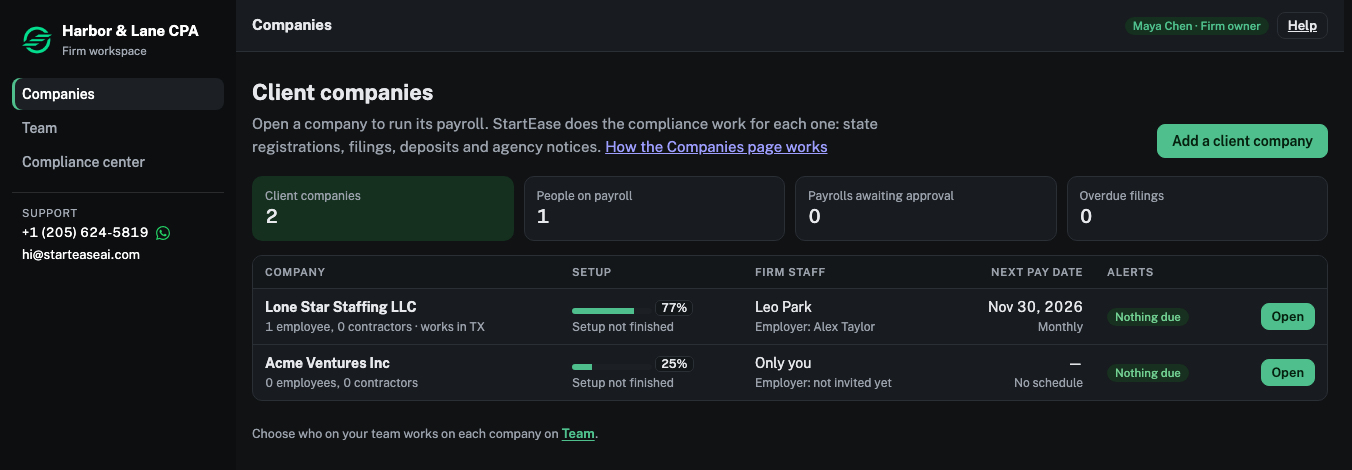
- Firm owner: you sign in to the firm home, with three pages: Companies, Team and Compliance center. Inside a company, ← All firm companies takes you back.
- Firm staff: you sign in straight to a company. If you work on more than one, choose the company from the Client list at the top.
How a firm gets set up
- StartEase creates the firm and sends the firm owner an email invitation.
- The firm owner sets a password and signs in.
- The firm owner adds the client companies and invites staff and each company's Employer.
A company already on StartEase can move into your firm only when it has agreed to be managed by your firm. StartEase makes the move, and the firm owner gets access straight away.
Tip. To set up a firm account, email hi@starteaseai.com with your firm name and the firm owner's name and work email.
Next: Add a client company